An invoice format in Excel is a reusable spreadsheet with places for your business details, your client's details, line items and payment terms, plus formulas that work out each amount, the tax and the total. Download the free template below, fill in the blanks, and save it as a PDF to send.
In India, Pakistan and elsewhere in South Asia the same document is often called a bill, so if you were looking for a bill format in Excel, this is it.
Get the Excel invoice template (.xlsx) as a free download, with no sign-up. It opens in Microsoft Excel, Google Sheets and Apple Numbers.
Key takeaways
- The free .xlsx template has 15 line-item rows and formulas for the due date, amounts, subtotal, tax and total. You only type the details.
- Set it up once, save it as a master, and make a copy for every invoice.
- Tax is calculated after any discount and rounded to cents, so the stored tax matches the printed tax.
- Send a PDF of the Invoice sheet, and protect the formulas from being typed over.
Free invoice format in Excel: what's in the download
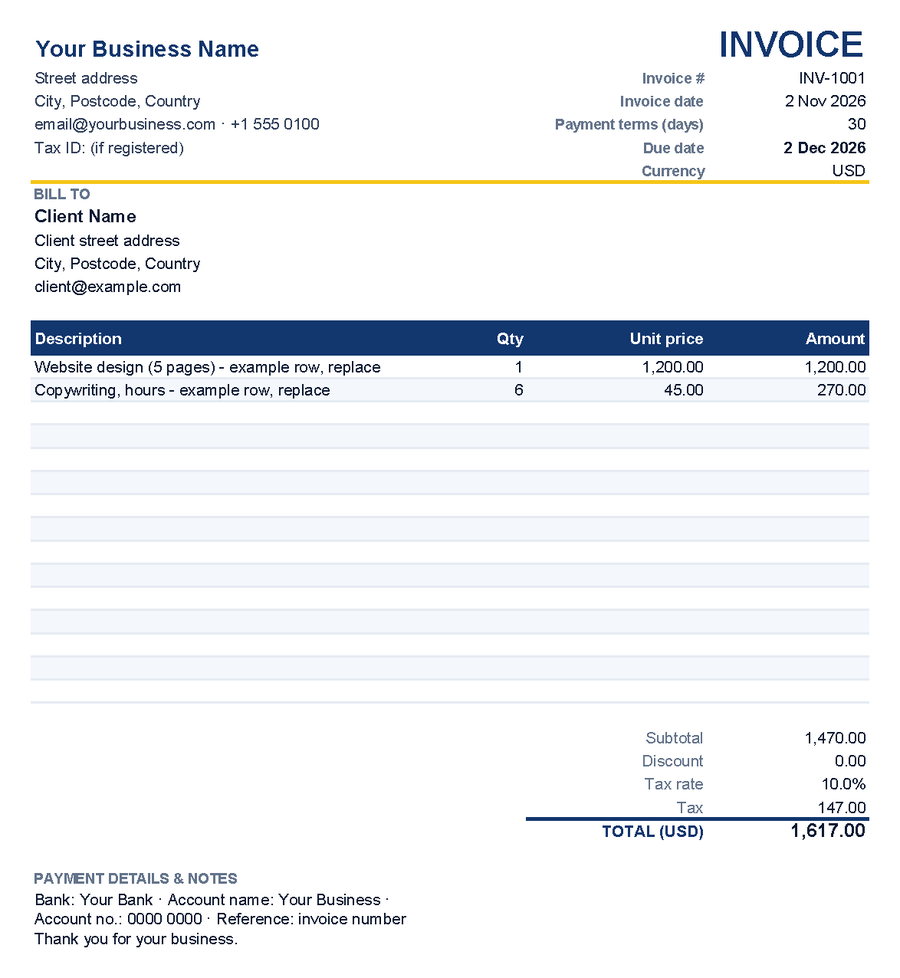
The workbook has two tabs: Invoice, the document you send, and How to use, a short checklist. The invoice is set in Arial, prints one page wide and includes two example rows that show the formulas working.
| Section | Cells | What goes there |
|---|---|---|
| Your business | B2 to B6 | Name, address, contact details, tax ID if registered |
| Invoice details | E3 to E7 | Invoice number, date, payment terms in days, currency code. The due date (E6) is calculated. |
| Bill to | B9 to B12 | Client name, address and email |
| Line items | Rows 15 to 29 | Description, quantity and unit price. The amount is calculated. |
| Totals | E31 to E35 | You enter the discount and tax rate. Subtotal, tax and total are calculated. |
| Payment details and notes | B38 and B39 | Bank details, payment reference, a short note |
Never type in E6, E15 to E29, E31, E34 or E35. Those cells hold the formulas.
How to customize the template (once)
Business details and payment terms
Replace the placeholders in B2 to B6 with your trading name, address and contact details. B6 is for a VAT, GST or sales tax number if you're registered; delete it if not. Set your usual payment terms in E5 (preset to 30 days) and your bank details in B38.
Required invoice details vary by country. The UK's list, for example, includes a unique number, both parties' names and addresses, the supply date and any VAT. Check with your tax authority or an accountant, and see the complete guide to professional invoicing.
Add your logo
The template has no logo, so insert yours as a picture in the empty row 1:
- Select row 1, choose Home > Format > Row Height and enter about 60 (Microsoft: row height).
- Click B1 and choose Insert > Pictures > This Device. If the menu offers Place over Cells, pick that first. On a Mac, use Insert > Pictures > Picture from File (Microsoft: insert pictures).
- Drag a corner handle to size it, then check File > Print. If the taller row pushes the notes onto a second page, set Height to 1 page under Page Layout > Scale to Fit (Microsoft: scale a worksheet).
Tax rate and currency
E33 holds one tax rate for the whole invoice, preset to 10%. Type yours with the percent sign (20%, 7.5%), or 0% if you don't charge tax, and rename the labels in D33 and D34 to VAT or GST if you like. There's no per-line tax column, so one invoice can't mix tax rates.
Put your currency code (USD, GBP, EUR, AED, INR) in E7. The total label in D35 picks it up: TOTAL (GBP), for example. The code is only a label: it doesn't convert amounts or add a symbol. To show a symbol, select the money cells (not the tax rate), open Format Cells and choose Currency or Accounting (Microsoft: format numbers as currency).
Save a master copy
Clear the example rows (select B15:D16 and press Delete, leaving column E alone), then choose File > Export > Change File Type > Template. From then on, File > New > Personal opens a fresh copy. If Personal is missing, set a default personal templates location under File > Options > Save (Microsoft: save a workbook as a template). In Google Sheets or Numbers, keep a clean master and copy it each time.
How to fill in each invoice, step by step
Download the free template if you haven't yet. Then, for each invoice:
- Open a fresh copy with File > New > Personal, or open the master and immediately save a copy under a new name, such as INV-1002 Contoso.xlsx.
- Type the next number in E3, never reusing or skipping one. This guide to numbering invoices covers formats that work.
- Enter the invoice date in E4 and check the terms in E5. The due date updates itself.
- Fill in the client's details in B9 to B12.
- List items in rows 15 to 29: description, quantity, unit price. Keep units in the description ("Copywriting, hours") and only numbers in Qty and Unit price. Clear, itemized line descriptions save you client queries.
- Enter any agreed discount as an amount in E32 and check the tax rate in E33.
- Add notes for this invoice in B39, such as a purchase order number or the supply date.
- Compare the total with your quote, save, and export the PDF.
Sample invoice in Excel: the formulas explained
These results come from the sample rows (1 × 1,200.00 and 6 × 45.00), dated 2 Nov 2026 with 30-day terms and 10% tax.
| Cell | Formula | In plain words | Result |
|---|---|---|---|
| E6 Due date | =E4+E5 | Invoice date plus payment terms. Dates are serial numbers, so +30 means 30 calendar days later. | 2 Dec 2026 |
| E15 to E29 Amount | =IF(OR(C15="",D15=""),"",C15*D15) | Stays blank until both quantity and unit price are filled in, then multiplies them. | 1,200.00 and 270.00 |
| E31 Subtotal | =SUM(E15:E29) | Adds the line amounts. Blank rows are ignored. | 1,470.00 |
| E34 Tax | =ROUND((E31-E32)*E33,2) | Subtotal minus discount, times the tax rate, rounded to cents. | 147.00 |
| E35 Total | =E31-E32+E34 | Subtotal minus discount plus tax. | 1,617.00 |
| D35 Label | ="TOTAL ("&E7&")" | Adds the currency code from E7 to the label. | TOTAL (USD) |
A worked example with a discount
Say you agree to take 100.00 off. Type 100 in E32 and the tax becomes ROUND((1,470.00 − 100.00) × 10%, 2) = 137.00, for a total of 1,470.00 − 100.00 + 137.00 = 1,507.00. For a percentage discount, enter a formula in E32 instead, such as =E31*5%.
Taxing the discounted amount matches UK guidance to charge VAT on the discounted price for basic discounts. Rules elsewhere can differ, so check locally or ask an accountant.
Why the tax is rounded
A number format only changes what you see; Excel calculates with the stored value. Without ROUND, 7.5% tax on 199.90 would be stored as 14.9925 and the total as 214.8925. It prints as 214.89, but copy the value into a tracker and a client who pays 214.89 leaves a 0.0025 balance that never clears.
Line amounts aren't rounded, which matters when you bill fractions at prices with cents: two lines of 1.5 hours at 10.99 show 16.49 each, yet the subtotal shows 32.97, because each line is really 16.485. Replacing C15*D15 with ROUND(C15*D15,2) in each amount formula prevents that.
Need more than 15 lines?
Right-click a row number from 16 to 29 and choose Insert, so the new row sits inside the SUM range; Excel then expands the range automatically. Drag the amount formula down from the row above into the new row. Rows added below row 29 aren't counted in the subtotal, and a protected sheet blocks inserting rows until you unprotect it.
How to save an Excel invoice as a PDF
Send clients a PDF, not the spreadsheet, and export only the Invoice sheet.
Windows: with the Invoice tab selected, choose File > Save As (or Save a Copy), pick a folder and set Save as type to PDF. Click Options and, under Publish what, keep the active sheet selected (Active sheet(s)) rather than the entire workbook, so the How to use tab stays out. Click OK, then Save (Microsoft: save as PDF).
Mac: with the Invoice tab selected, choose File > Print and keep Print set to Active Sheets, clicking Show Details if you don't see it (Microsoft: print in Excel for Mac). Then open the PDF menu and choose Save as PDF.
Check the PDF before sending: one page, nothing cut off, the right client and number. Name it clearly (INV-1002 Contoso.pdf), and see how to email an invoice for the covering note.
Using the template in Google Sheets or Apple Numbers
Google Sheets
Choose File > Import, upload the .xlsx file and select Create new spreadsheet (Google: import data). The template uses only IF, OR, SUM and ROUND, so the totals keep working. Add a logo with Insert > Image, placed over the cells (Google: add an image).
For the PDF, choose File > Print, select Current sheet and click Next. If the Amount column is cut off, adjust the scale in the print settings.
Apple Numbers
On a Mac, drag the file onto the Numbers icon or choose File > Open (Apple: import an Excel file). On iPhone or iPad, tap Browse in the document manager, then tap the file (Apple: Numbers on iPhone).
For a PDF of just the invoice on a Mac, choose File > Print, select This Sheet at the bottom of the Print Setup sidebar, click Print, then choose Save as PDF from the PDF menu (Apple: print in Numbers).
Before using File > Export To > PDF, or exporting on iPhone or iPad (More, or the Action Menu button on iPad, then Export > PDF), delete the How to use sheet from your copy (Apple: export a spreadsheet).
Common spreadsheet invoicing mistakes
- Typing over a formula. A typed-in amount or total stops updating, so later changes leave the invoice wrong. Because protection locks every cell by default, first clear the Locked box for the input cells (Format Cells > Protection), then turn on Review > Protect Sheet.
- Text where numbers belong. "6 hrs" in Qty, or a date Excel doesn't recognize, produces #VALUE! in the amount and every total.
- Duplicate invoice numbers. The classic slip is copying last month's file and forgetting E3. Duplicates confuse clients and your books, and UK VAT invoices, for example, need a sequential number that uniquely identifies the document.
- Overwriting the master. Fill in the master, press Save, and next month's invoice starts with last month's client and items. Use a template, or Save As before you type anything.
- Version chaos. Files called "invoice final (2).xlsx" make it hard to prove what you sent. Name files by invoice number and client, treat the PDF as the record, and log each invoice in an invoice tracker.
Excel invoice vs invoicing app: a fair comparison
A spreadsheet works fine for invoicing, as long as you look after the formulas, numbering and payment tracking yourself.
| Excel template | Invoicing app (for example, Invoicious) | |
|---|---|---|
| Cost | Free if you already have Excel, Google Sheets or Numbers | Free to download, with optional Premium in-app purchases |
| Flexibility | Change any cell, column or formula | Work within the app's templates, with your logo and branding |
| Calculations | Formulas you have to keep intact | Tax and discounts calculated automatically |
| Currency | Edit the code and number format by hand | Multi-currency support |
| Repeat clients | Retype details or copy an old file | Saved client details; duplicate an invoice for repeat billing |
| Sending | Export a PDF, then attach it to an email | Share the PDF by email or Messages |
| Who has paid | A separate tracker you keep up to date | Paid, unpaid and overdue status tracking |
| Where it works | Windows, Mac or a browser; desktop apps work offline | iPhone and iPad (also Apple-silicon Macs); works offline |
Keep the spreadsheet if you send a few invoices a month from a computer, need a custom layout, or don't use an iPhone or iPad. An app makes more sense when you invoice weekly, bill away from your desk or lose track of who has paid. An invoice generator app for iPhone and iPad does the arithmetic for you; preview its professional invoice templates first.
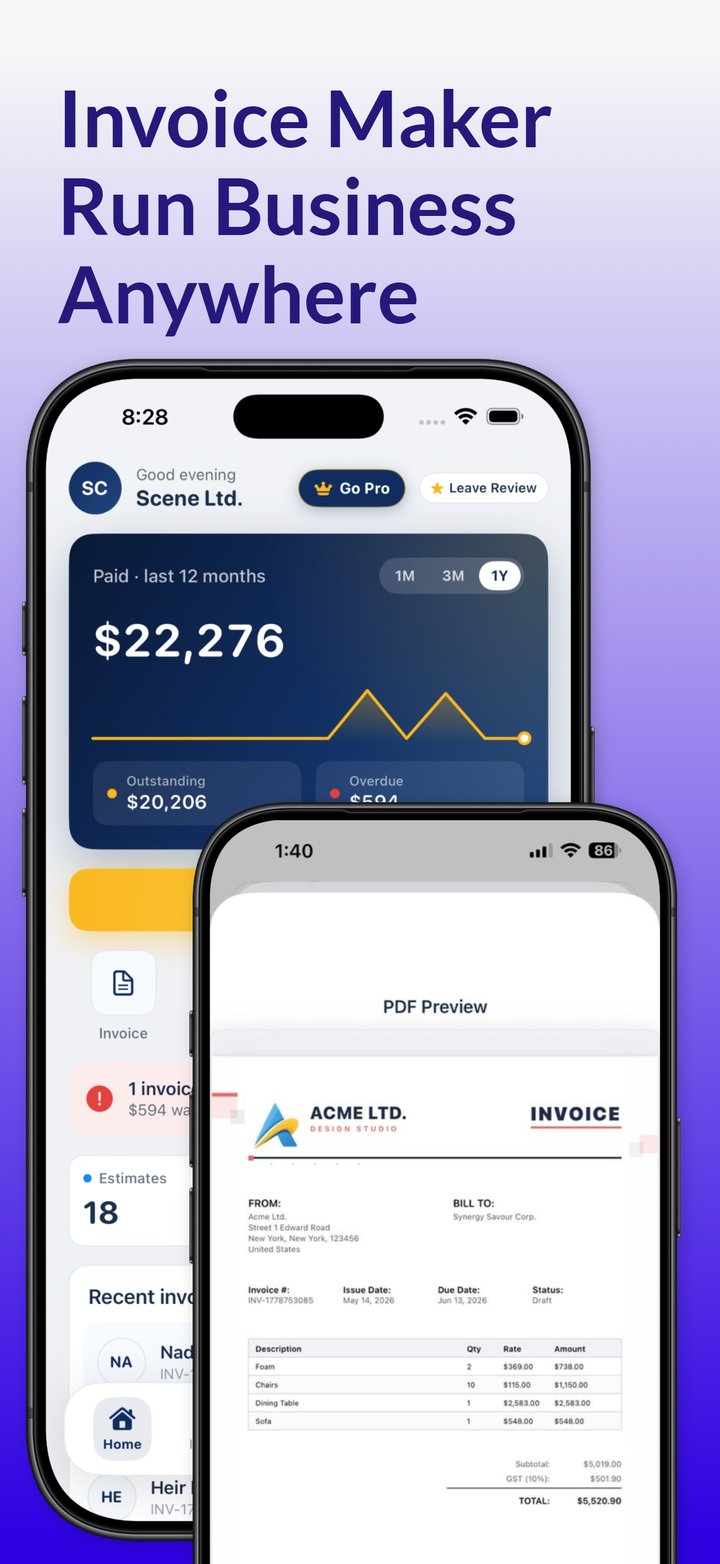
Invoicing from your iPhone or iPad? Invoicious builds the same kind of invoice from a template, calculates tax and discounts, handles multiple currencies, shares the PDF and shows which invoices are paid, unpaid or overdue.
Get Invoicious free